3D Logo Mockup Luminous: A Practical Guide to Elevating Brand Presentations
In the digital age, first impressions are often formed in milliseconds. For business owners, designers, and creative professionals, the way a logo is presented can be just as important as the design itself. A flat, two-dimensional image rarely conveys the depth, quality, or personality of a brand. This is where high-quality visual assets come into play. Among the various tools available to enhance brand visibility, the 3D Logo Mockup Luminous has emerged as a powerful resource for those seeking to add realism and impact to their presentations.
This guide explores what this specific mockup template offers, how it functions, and why it might be the right tool for your next project. We will move beyond simple marketing claims to examine the practical benefits, technical specifications, and real-world applications that make this asset valuable for both seasoned designers and beginners alike.
Understanding the Concept of 3D Logo Mockups
Before diving into the specifics of the 3D Logo Mockup Luminous, it is helpful to understand the broader category of 3D mockups. Traditionally, showcasing a logo involved placing a PNG file onto a plain background or a simple surface. While functional, these methods often look artificial and fail to capture attention in competitive markets.
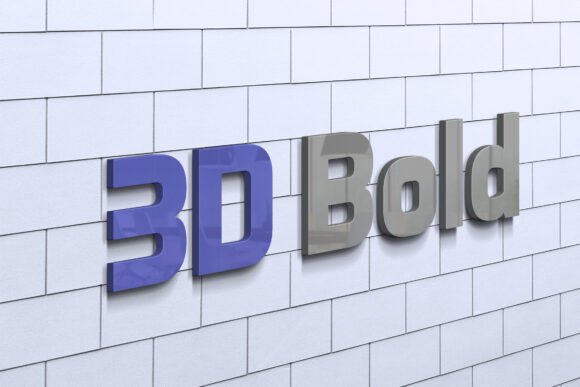
A 3D mockup simulates real-world lighting, shadows, textures, and perspective. It transforms a flat graphic into an object that appears to exist in physical space. The "Luminous" aspect specifically refers to the lighting effects included in this template—glows, reflections, and soft highlights that give the logo a premium, polished finish. This type of presentation is particularly effective for social media profiles, website headers, pitch decks, and product packaging previews.
Key Features of the 3D Logo Mockup Luminous
The value of any design asset lies in its usability and flexibility. The 3D Logo Mockup Luminous is designed with efficiency and ease of use in mind. Below are the core features that define its functionality:
Smart Object Replacement Technology
One of the most significant advantages of this mockup is its compatibility with Adobe Photoshop’s Smart Objects. This feature allows users to replace the placeholder image with their own logo, text, or design simply by double-clicking the designated layer. Once you drop in your new design and save the changes, the mockup automatically applies the correct transformations. Your design will instantly adopt the curves, shadows, and lighting effects of the 3D model, ensuring a seamless integration without manual warping or masking.
High-Quality Resolution and Realism
Visual fidelity is critical for professional presentations. This mockup comes in a resolution of 3600 x 2400 pixels at 300 DPI. This high resolution ensures that the final output remains crisp and clear, whether viewed on a large monitor, printed on a billboard, or shared on high-density mobile screens. The realistic rendering includes accurate shadow casting and ambient occlusion, which helps ground the logo in the scene and prevents it from looking like a floating sticker.
User-Friendly Organization
For those who may not be expert Photoshop users, the organization of the file layers is crucial. The 3D Logo Mockup Luminous is fully layered and well-organized into folders. This structure makes it easy to locate specific elements if you wish to tweak colors, adjust lighting intensity, or modify the background. Even if you only intend to replace the logo, having a clean file structure reduces the risk of accidental edits to other parts of the composition.
Who Can Benefit From This Tool?
The versatility of the 3D Logo Mockup Luminous means it serves a wide audience. Here is a breakdown of who gains the most value from using this asset:
- Freelance Graphic Designers: When pitching concepts to clients, presenting a logo in a stunning 3D format can significantly increase perceived value. It demonstrates professionalism and attention to detail.
- Small Business Owners: Entrepreneurs who manage their own branding need tools that require minimal technical skill. This mockup allows business owners to create professional-grade visuals without hiring expensive designers for every update.
- Social Media Managers: Content creators constantly need fresh visuals to engage audiences. A luminous, 3D logo stands out in crowded feeds, helping brands maintain a consistent and eye-catching aesthetic.
- Print-on-Demand Sellers: If you sell branded merchandise, showing customers how a logo looks on a product is essential. This mockup provides a quick way to generate preview images for listings.
Practical Applications and Use Cases
To truly appreciate the utility of this mockup, consider some common scenarios where it excels:
- Portfolio Presentations: Enhance your design portfolio by displaying your logos in dynamic 3D environments. This adds depth to your case studies and shows potential employers or clients that you understand modern presentation standards.
- Brand Identity Launches: When launching a new brand, consistency is key. Using a uniform, high-quality mockup across all launch materials—emails, landing pages, and social posts—creates a cohesive and memorable introduction.
- Marketing Campaigns: For limited-time offers or special events, a glowing or luminous logo can draw immediate attention. The light effects naturally guide the viewer’s eye to the central element of the design.
- Resume and Personal Branding: Creative professionals can use this mockup to display their personal logo on resumes or LinkedIn banners, adding a touch of sophistication to their professional profile.
Evaluating Suitability and Limitations
While the 3D Logo Mockup Luminous is a robust tool, it is important to have realistic expectations. No single template fits every scenario perfectly. Here are some considerations to keep in mind:
Software Requirements
This mockup is provided as a PSD (Photoshop Document) file. Therefore, you must have access to Adobe Photoshop or compatible software that supports Smart Objects. If you rely solely on free or web-based design tools that do not support PSD editing, you may find this asset difficult to utilize. Always ensure your workflow aligns with the file format before purchasing or downloading.
Design Compatibility
Not all logos work equally well in 3D environments. Highly complex logos with intricate details might lose clarity when subjected to heavy shadows or glows. Similarly, very thin lines may become obscured by the lighting effects. It is advisable to test your logo within the mockup to ensure legibility. Simple, bold designs often yield the best results in luminous 3D settings.
Customization Limits
While the mockup is described as "100 Editable," this usually refers to the ability to change colors, backgrounds, and the main logo image. However, the fundamental geometry of the 3D model—the shape of the surface, the angle of the camera, and the base lighting setup—is likely fixed. If you need a radically different perspective or material (e.g., changing a glass effect to wood), this specific mockup may not offer that level of structural modification.
How to Get Started
Using the 3D Logo Mockup Luminous is a straightforward process. Here is a general workflow to help you achieve the best results:
Step 1: Open the File
Launch Adobe Photoshop and open the provided PSD file. Ensure your workspace is set up for efficient editing.
Step 2: Locate the Smart Object
Navigate through the organized layers to find the Smart Object thumbnail. This is typically labeled clearly, such as "Your Logo Here" or "Replace Me."
Step 3: Insert Your Design
Double-click the Smart Object layer. A new window will open, displaying a blank canvas. Paste your logo here, ensuring it is centered and appropriately sized. Save the file (Ctrl+S or Cmd+S) and close the window.
Step 4: Review and Export
Return to the main document. Your logo should now appear integrated into the 3D scene with realistic lighting. Adjust the position if necessary, then export the final image as a JPEG or PNG for your intended use.
Conclusion
The 3D Logo Mockup Luminous represents a practical solution for anyone looking to elevate their visual communications. By combining high-resolution realism with user-friendly Smart Object technology, it bridges the gap between professional design capabilities and accessible tools. Whether you are a seasoned designer aiming to impress a client or a business owner seeking to polish your brand image, this mockup offers a reliable way to add depth and allure to your logos.
Remember that the effectiveness of any mockup depends on the quality of the underlying design and the appropriateness of its application. By understanding its features and limitations, you can leverage this tool to create compelling, professional presentations that resonate with your audience. In a world where visual appeal drives engagement, investing in high-quality presentation assets is a smart strategic move.